
SublimeLinter は単体では使えず、必要な言語別のパッケージを別途インストールする。
SublimeLinter-html-tidy
tidy-html5 にしてみる。
brew install --HEAD tidyそれからパッケージ SublimeLinter-html-tidy をインストール。
SublimeLinter-csslint
まず npm で csslint をインストール。
npm install -g csslintそれからパッケージ SublimeLinter-csslint をインストール。
SublimeLinter-contrib-scss-lint
まず gem で scss-lint をインストール。
sudo gem install scss-lintそれからパッケージ SublimeLinter-contrib-scss-lint と、.scss のシンタックス SCSS をインストール。シンタックスがないと動かない。
SublimeLinter-jshint
まず npm で jshint をインストール。
npm install -g jshintそれからパッケージ SublimeLinter-jshint をインストール。
SublimeLinter-phplint
homebrew で phplint をインストールするんだけど、
brew install homebrew/php/phplint
(中略)
Error: phplint cannot be built with any available compilers.
To install this formula, you may need to:
  brew install gcc
と言われたので gcc をインストール。やたら長いしファンはぶんぶん回ってるし、がくぶるでしたが無事終了。あらためて phplint をインストール。
brew install homebrew/php/phplintそれからパッケージ SublimeLinter-phplint をインストール。
Gutter Theme を変更
エラー表示に使われるマーク「Gutter Theme」は、あらかじめ用意されている中から選ぶことができる。
Which gutter theme you use is a matter of taste. Below is a list of the built in gutter themes that come with SublimeLinter.
Gutter Themes — SublimeLinter 3.4.24 documentation
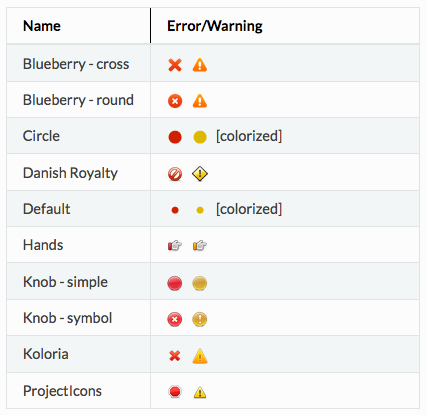
コマンドパレットで SublimeLinter: Choose Gutter Theme と入力すると設定画面が表示されるので、好きなやつを選ぶ。